
Search

Concertina block

What is a concertina block?

A concertina block allows users to show and hide sections of content, revealing information only when it is needed. This helps reduce the page length and make content easier to scan.

Concertinas are commonly used for:

  • Frequently Asked Questions (FAQs)
  • Supporting or secondary information that is not essential for all users
  • Detailed explanations, guidance, or contextual content that would otherwise interrupt the main user journey

It is very easy to overuse concertinas

Use concertinas when content is useful but not required for every user to complete their task. Avoid placing critical information inside a concertina if users are likely to miss it.
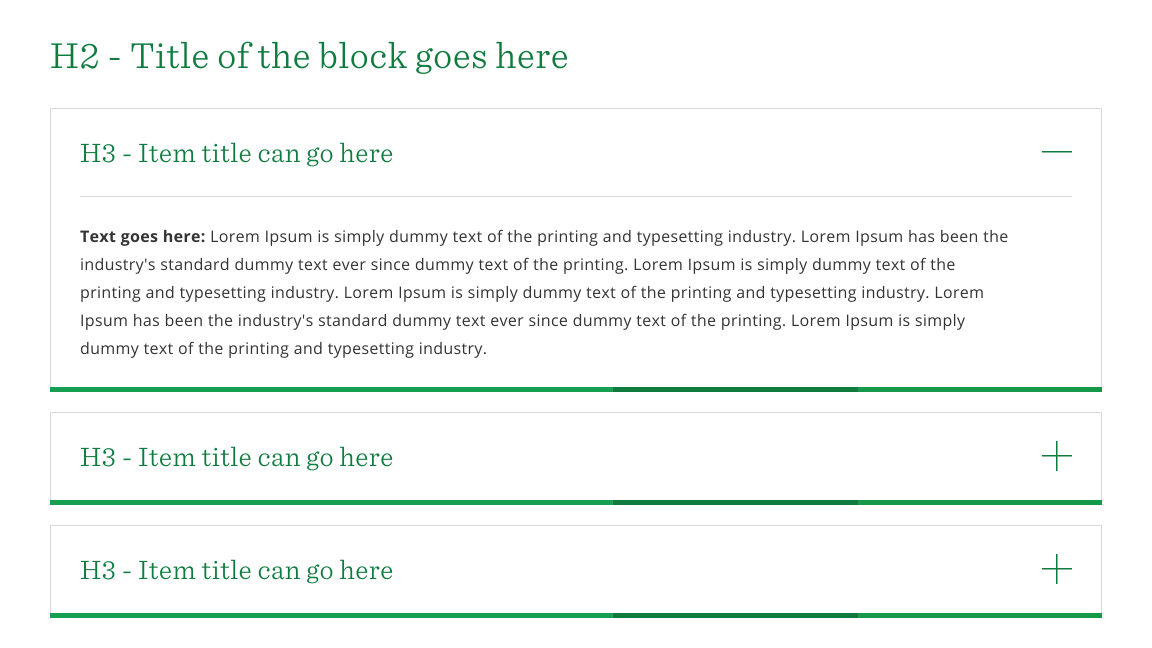
Anatomy

Concertina block

concertina-block.svg

Specification

  • Container header (optional)
  • Title (required)
  • Text (required)
 

Usage guidelines

Do's

  • Use concertinas to progressively disclose content that is helpful but not essential for every user.
  • Use concertinas to reduce page length and make content easier to scan.
  • Use clear and descriptive headings so users can quickly identify the content and if they need to look at it.
  • Group related concertinas together.
  • Consider the user's goals and place the most important information outside the concertina where possible.
  • Use them for FAQs, further explanation, supporting guidance, definitions, and advanced or infrequently needed information.

Don'ts

  • Don't place critical or primary information inside a concertina especially if users will need to see this content.
  • Avoid creating a long list of concertinas on a single page
  • Don't use vague titles such as 'More information' or 'Additional details' that give users no indication of the content inside.
  • Ensure users do not have to open several concertinas to compare related information.
  • Don't include overly long content within a concertina, if you find you're doing this please reconsider your page design.
  • Ensure users do not need to remember information from one concertina to another.

Behaviour

  • The concertina title, icon and entire panel should collapse/expand when interacted with via the mouse/keyboard or other assistive device
  • If there are multiple concertinas on the page these can be configured to have one or many open at a time.